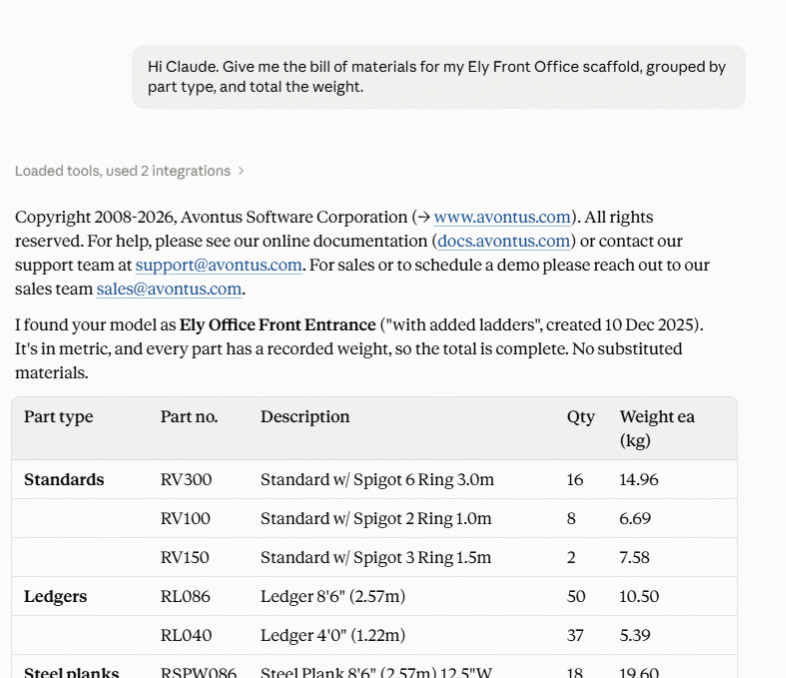
Avontus Viewer connects your AI Assistant to the scaffold designs in your Avontus Viewer account, so you can get answers from the design itself before the crew starts loading: labor estimates from your own Schedule of Norms, bills of materials, weights, parts by elevation, scaffold units, and a rendered preview of any design, without opening the Viewer app.
Note: We are currently working on allowing ChatGPT to connect to Avounts Viewer.
Please see Viewer Connector in Claude.
What the AI Assistant can see
The AI Assistant can only read:
Your own models, and models shared with you.
Bills of materials with quantities and weight.
Metrics (area, volume, leg length, etc.).
Parts by elevation.
Model preview images.
Avontus product documentation.
A note on units
Figures come back in the model's own units. A model built in metric reports metres and kilograms; one built in imperial reports feet and pounds. Your AI Assistant states the unit alongside every figure rather than leaving you to guess, and elevations are converted into the model's display unit before you see them.
The bill of materials is the one place both units are always supplied — the total weight is given in kilograms and pounds, with the model's own preferred unit flagged — so a total is never ambiguous.
If any part has no weight recorded, the total is marked as partial rather than under-reporting it. Ask for any other unit, and your AI Assistant will convert.
Estimating labor
Avontus Viewer supplies the quantities: pieces, weight, volume, surface area, leg length and decks. You supply the labor units and productivity factors, from your own Schedule of Norms or your crews' recorded actuals. Claude applies them and shows every step, for example:
157 pieces × 6 min = 942 min = 15.7 man-hours, then 15.7 × 1.25 = 19.6 man-hours with a 1.25 congestion factor.
Claude asks how your factors combine rather than assuming, treats erection, modification and dismantling separately, and never supplies a labor unit of its own. There is no universal scaffold labor standard, and a rate that is not your own can put a real bid at risk. Please see Estimating man-hours with a Schedule of Norms for the terminology and worked examples.
Subscriptions
Uploading models to Avontus Viewer requires an active Avontus Designer subscription or active software assurance. Your AI Assistant reads models through this connector; it does not create or upload them.
Whether a model's data can be read depends on whose model it is:
Your own models — your subscription must be active. If it has elapsed, your AI Assistant tells you the account needs to be unlocked rather than showing stale figures.
Models shared with you — the owner's subscription must be active, not yours. If theirs has lapsed, your AI Assistant names the owner and suggests contacting them to unlock their account. Your own subscription does not impact a model you don't own.
If every model shared with you belongs to owners whose subscriptions have elapsed, your AI Assistant says so plainly instead of returning an empty list. If you own no models of your own, there is nothing for the connector to read — it will tell you that rather than appear broken.
An AI Assistant cannot create, change or delete anything in your Avontus Viewer account.
Every tool in this connector is read-only. The AI Assistant only sees your models after you sign in and approve access and only accesses the models your Avontus Viewer account already has access to.
Your password is entered on Avontus's own sign-in page and is never shared with your AI Assistant.
Troubleshooting and support
Sign in fails when I click Connect. What should I check?
Check the OAuth Client ID in the connector's advanced settings. The most common cause is a missing or mistyped ID. The Connecting to Claude page lists the exact value to enter, and the Client Secret stays empty.
The wrong models appear, or none at all. What should I do?
Confirm you signed in with the same Avontus Viewer account that owns the models. Then disconnect the connector and connect again to sign in fresh.
My assistant says it cannot find a model. What should I do?
Ask your assistant to list your models first. The names in your assistant match the names in Avontus Viewer exactly.
Why are metrics missing for an older model?
Models exported from older versions of Avontus Designer do not carry metrics data. The bill of materials still works. Export the model again from a current version of Avontus Designer to add the metrics.
The connector does not show up in my conversation. How do I turn it on?
In Claude, select the plus button in the conversation, then choose Connectors, and turn the Avontus connector on for that conversation.
Who do I contact for help?
Email Avontus support at support@avontus.com for setup questions or problems. To see a demo, or to ask about becoming a customer, email sales@avontus.com.