On ScaffoldIQ, you have the ability to work offline. This allows you to make changes using ScaffoldIQ in locations when you may not have a signal. This could be for safety reasons or you are in an area where the strength of the WiFi or data connection is very weak.
Whenever you wish to work offline you will download the latest data. When offline you will make the required changes to the Request, Scaffold, Activities, etc., and when you wish to reconnect you can synchronize the changes you made offline into the live database.
You can use offline sync with IOS and Android devices.
Please note, while offline:
- You are unable to delete and reject a Scaffold in the Awaiting Build status
- You are unable to edit an Inspection or Handover offline that was created online
- You are unable to open an attachment - you will only be able to see the file size and name
- You can synchronize a maximum of 80 items. These are items you are assigned to or are being watched by yourself. If you have more than 80 items, you will need to unassign or "unwatch" some items to bring the total items below 80.
- You can only be offline for a maximum of five days before you must synchronize your changes else you will lose your changes.
- You cannot delete a Request or Scaffold.
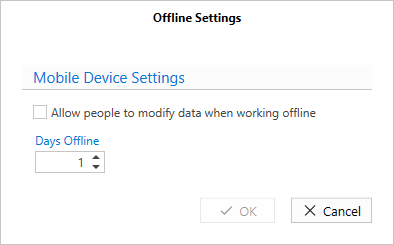
Allow People to modify data when working offline - Click this to allow users to modify data offline.
Days Offline - This allows you to specify the number of days before a user can synchronize their data else they lose the changes they made offline. The maximum number is 5.