When you click the Boiler Scaffold button in the Structures tab or click and drag the Boiler shape onto a Drawing Page, the Boiler Scaffold dialog appears. Use the three tabs in this dialog to define the characteristics of the Boiler itself, the characteristics of the scaffold inside the Boiler and the layout of the scaffolding.
The Boiler Properties Tab
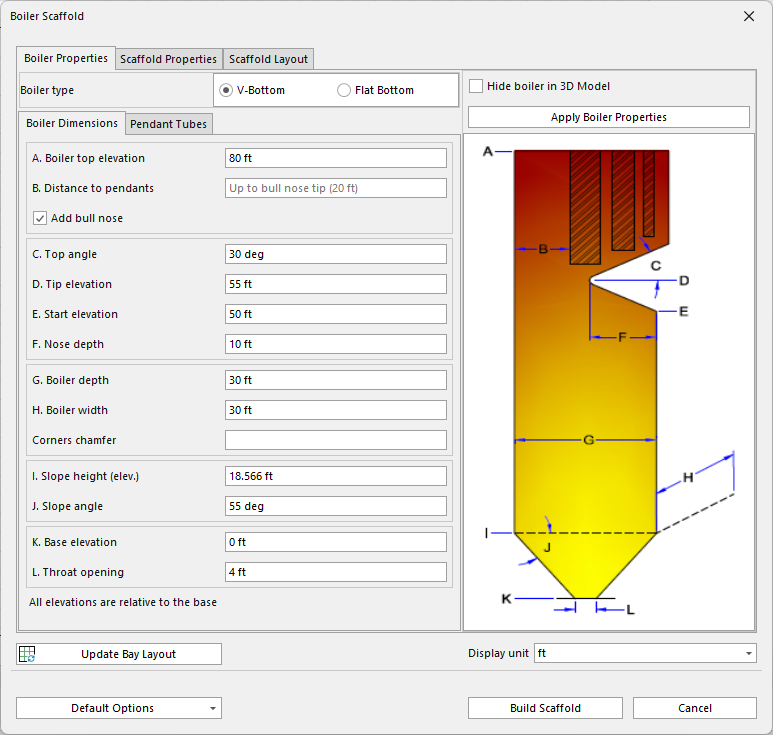
The Boiler Properties tab has two sub-tabs that enable you to configure the details of the boiler into which Avontus Designer will build scaffolding. While each tab has its own settings, the Boiler Properties tab has general settings that remain in view no matter which tab you select.
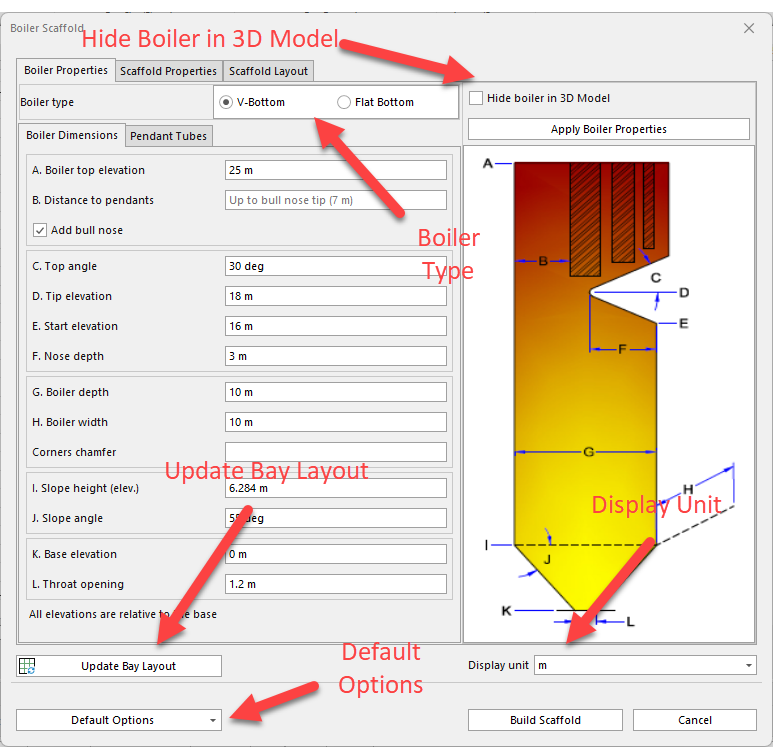
| Boiler Type | Select the appropriate shape for the bottom of the new Boiler: V-Bottom or Flat Bottom. |
| Display Unit | Select the unit of measure that Avontus Designer will use when it displays the new Boiler. Your options are ft, in, ft-in, m, cm, mm. |
| Default Options | Save Current Values as default - Click this to save the current values as default Restore Dialog to Last Saved Options - Click this to restore the dialog to the last saved options Restore Dialog to Factory Settings - Click this to return the settings in the Boiler Properties tab to the default factory settings. |
| Update Bay Layout | If you make changes in the Boiler Properties tab and then click Update Bay Layout, Avontus Designer makes those changes in the Boiler on the Drawing Page without closing the Boiler Scaffold dialog. |
| Hide Boiler in 3D | Click here to hide the boiler in the 3D model |
Boiler Dimensions Tab
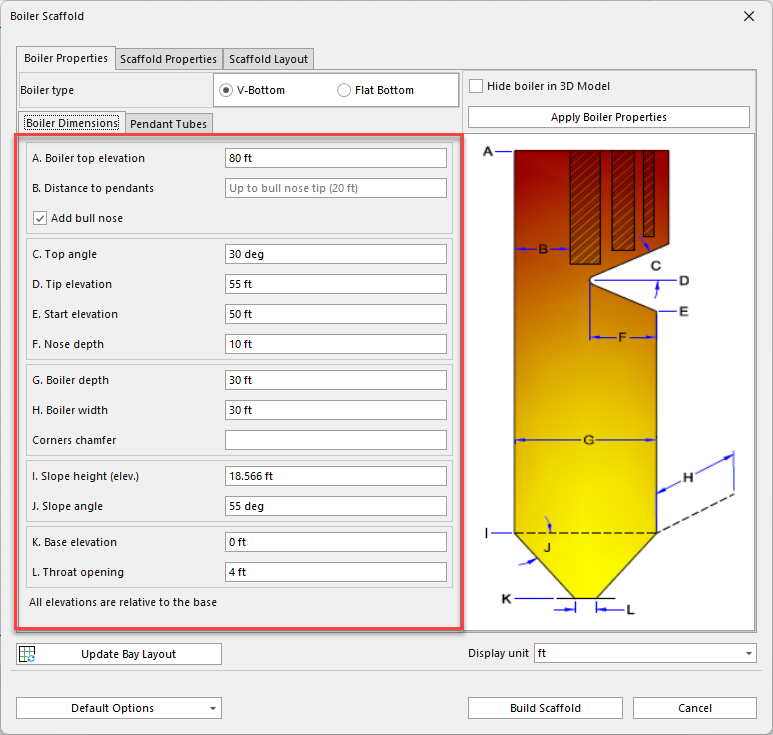
The Boiler Dimensions tab enables you to determine the exact dimensions of each Boiler you create.
| Boiler Top Elevation | The Boiler Top Elevation is the distance from the bottom of the base to the top of the superheater. |
| Distance to Pendants | The Distance to Pendants is the distance from the back of the Boiler to the edge of the first pendant. |
| Add Bull Nose | Click this to enable/diable the Bull Nose |
Top Angle | The Top Angle is the angle created from a horizontal line drawn through the tip of the bullnose and the top edge of the bullnose. |
| Tip Elevation | The Tip Elevation is the distance from the Base Elevation to the tip of the bullnose. |
| Start Elevation | The Start Elevation is the distance from the Base Elevation to the bottom of the bullnose. |
| Nose Depth | The Nose Depth is the distance from the birdcage to the tip of the bullnose. |
| Boiler Depth | The Boiler Depth is the distance from the front to the back of the Boiler. |
| Boiler Width | The Boiler Width is the distance from one side of the Boiler to the other. |
| Corners Chamfer | The Corners Chamfer is the cutaway from the corners of the Boiler, which reduces the corner angles from 90 degrees. The number entered is the number of feet or meters (depending on your default unit/) that the chamfer is cut in from the corner. |
| Slope Height (elev) | The Slope height is the distance from the Base Elevation to the top of the hopper. |
| Slope Angle | The Slope Angle is the angle created by a horizontal line across the top of the hopper and the side of the hopper. |
| Base Elevation | The Base Elevation is the distance from the bottom edge of the Boiler and the ground. |
| Throat Opening | The Throat Opening is the distance across the throat. |
Pendant Tubes Tab
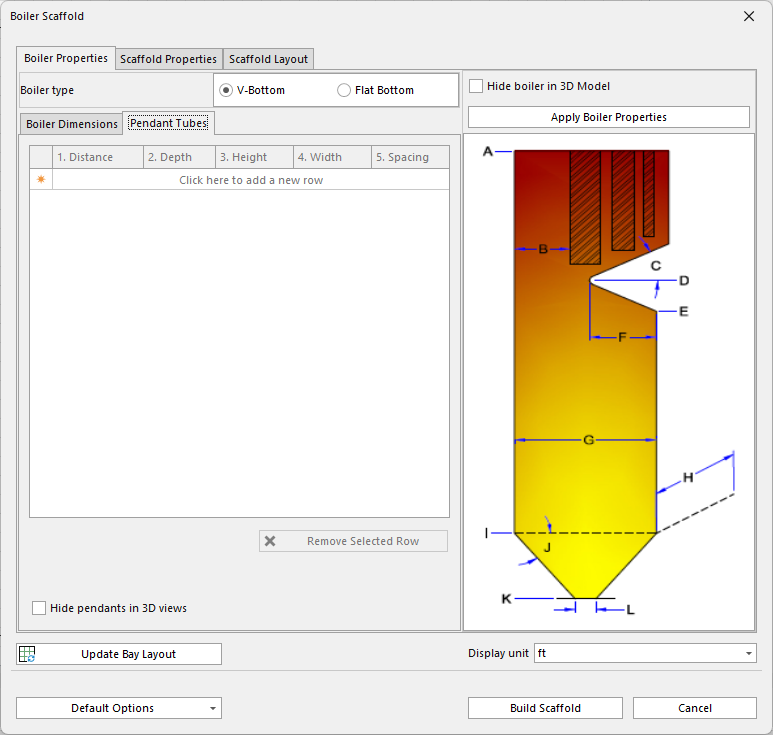
The Pendant Tubes tab enables you to add, delete and configure rows of pendants in any Boiler you create. Each row you add represents a row of pendants.
| Distance | The Distance is the distance from the back wall of the Boiler to the back edge of the pendant row. |
| Depth | The Depth is the distance from the front of a pendant to the back. |
| Height | The Height is the measurement from the top of a pendant to the bottom. |
| Width | The Width is the distance from one side of a pendant to the other. |
| Spacing | The Spacing is the distance between pendants in a row. |
| Remove Selected Row | Click Remove Selected Row to delete the currently selected row. |
| Hide Pendants in 3D View | Check the Hide Pendants in 3D View checkbox to hide the pendants (but not the Boiler) when viewing the Boiler in the 3D view dialog. |