The Scaffold properties tab modifies the properties of the Boiler's Scaffold.
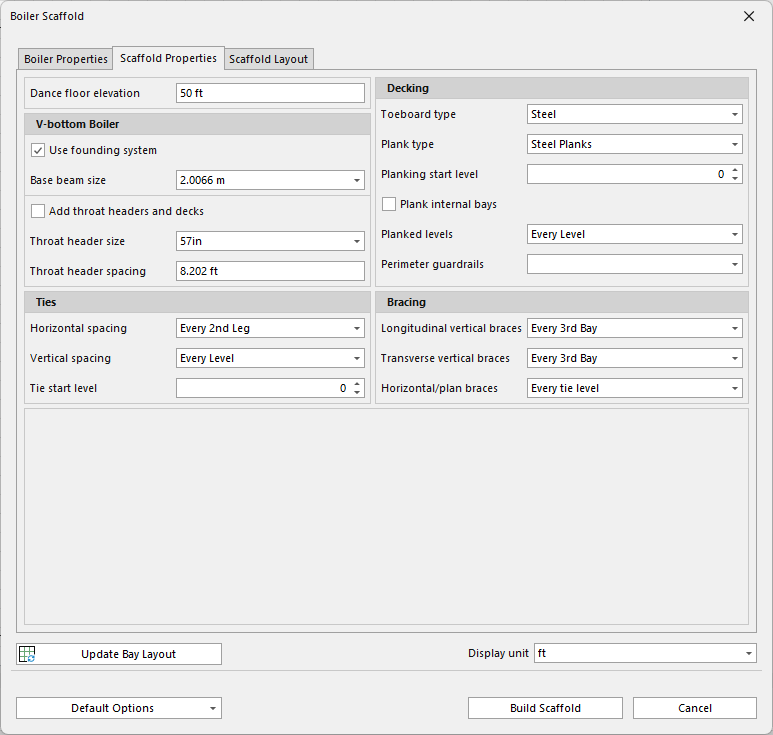
| Dance Floor elevation | Distance from the bottom of the tank to the top level of the Dance Floor/Birdcage. |
| V-Bottom Boiler | |
| Use founding system | Enable to disable the Founding system |
| Base Beam size | Click the drop-down to select the size the Base beam |
| Add throat headers and decks | Click the checkbox to add throat headers and decks to the Bay scaffold |
| Throat header size | Throat Header Size is the size of the part used to span above the Throat Header |
| Throat header spacing | Throat Header Spacing is the dimension, or part size used to space the Headers, this would be a bay size. |
| Ties | |
| Horizontal Spacing | Click the drop-down to select how often ties are placed horizontally on the Scaffold |
| Vertical spacing | Click the drop-down to select how often ties are placed vertical on the Scaffold |
| Tie Start Level | Click the drop-down to select at that level the ties should appear on the Scaffold |
| Decking | |
| Toeboard Type | Select the toeboard type for the decking |
| Plank Type | Select the plank type for the decking |
| Plank Starting Level | Select at which point the planking for bays begins |
| Plank internal Bays | Plank the internal bays of the boiler scaffold |
| Planked Levels | Select what levels of the scaffold is planked. |
| Perimeter Guardrails | Select where to apply perimeter Guardrails. |
| Bracing | |
| Longitudinal Vertical Braces | Select how often to apply longitudinal vertical braces |
| Transverse Vertical Braces | Select how often to apply transverse vertical braces |
| Horizontal/Plan braces | Select how often to apply horizontal/plan braces |