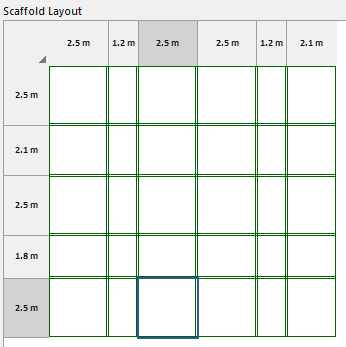
You can modify the default design values in the Scaffold Layout tab.
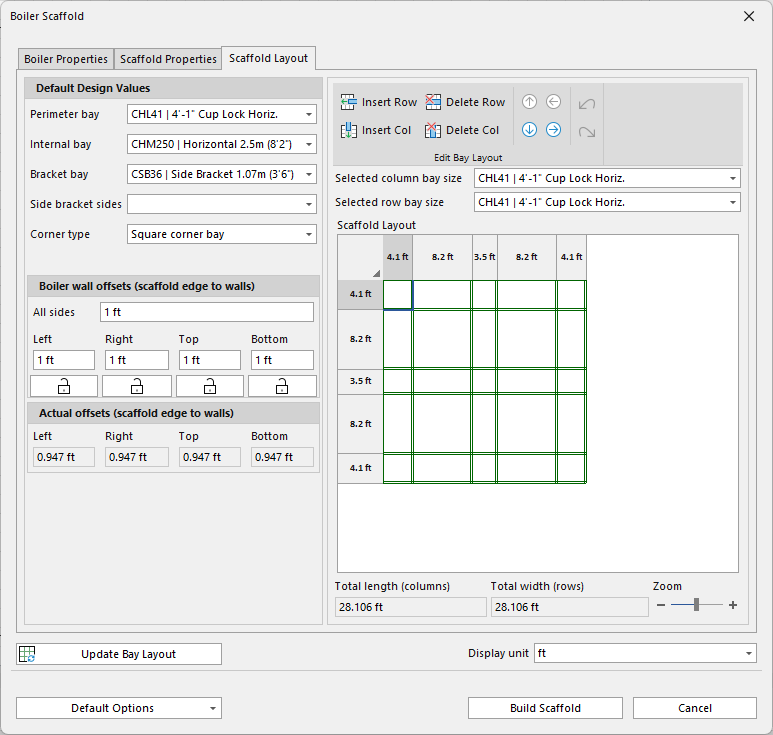
| Default Design Values | |
| Perimeter Bay | Select the Perimeter Bay. |
| Internal Bay | Select the internal Bay. |
| Bracket Bay | Select the Bracket Bay. |
| Side Bracket Sides | Select the Side Brackets Bay. |
| Corner Type | Select the Corner Type. |
| Boiler Wall Offset | |
| All Sides | All Sides is the default offset from the wall of the boiler to the scaffold. |
| Left, Right, Top, Bottom | Left, Right, Top and Bottom allow the user to edit each side to their requirements. |
| Actual Offsets | Actual Offsets show what the actual offsets are once the scaffold has been calculated. |
| Insert/delete Row | Insert or delete a Bay row on the Scaffold layout |
| Use these buttons to move along the bay rows or columns. |
| Use these buttons to undo or redo actions. |
| Selected column bay size | Adjust the column bay size |
| Selected row bay size | Adjust the row bay size. |
| This is the scaffold layout. Use the bottoms above to modify the layout. |