The Bay Levels interface of the Drawing Options dialog enables you to determine the materials Avontus Designer will use on each bay level when you create new bays.
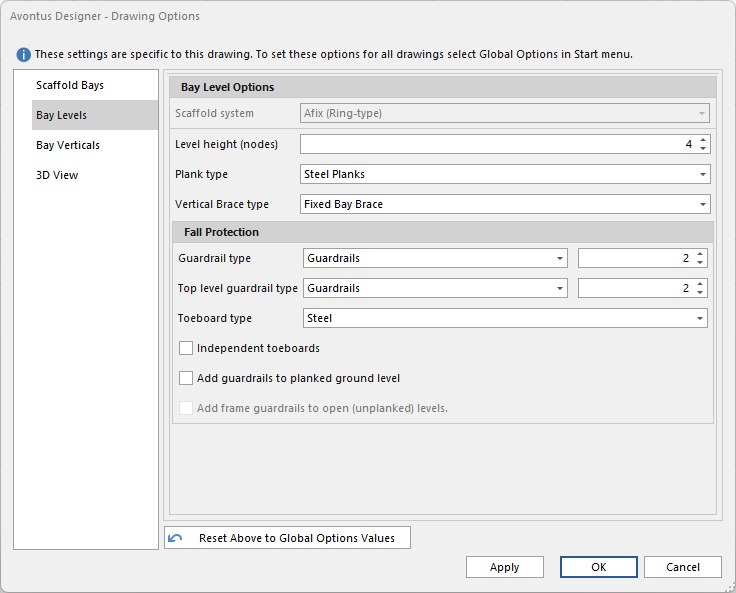
Level Height (nodes) - Specify the node height for this drawing
Plank type - Specify the default plank type for this drawing
Vertical Brace type - Specify the default fixed bay brace type for this drawing.
Guardrail Type - Specify the default guardrail type, and the number of guardrails for this drawing.
Top Level Guardail Type - Specify the top default guardrail type and the number of top guardrails for this drawing.
Toeboard type - Specify the default toeboard type for this drawing.
Independent toeboards - Enable this to add independent toeboards to all new Scaffolds by default.
Note: If you leave this checkbox empty, Avontus Designer links toeboards to guardrails. If guardrails are removed for a bay/level, Avontus Designer automatically also removes the toeboards as well. If this checkbox is checked, turning off guardrails will have no affect on toeboards.
Add guardrails to planked ground level - Enable this to add guardrails to any planked bay at ground level.
Add frame guardrails to open (unplanked) levels - Enable this to add a frame guardrail to any unplanked levels. Only available when Frame Guardrail is selected under Guardrail Type.