In order to ensure that the data in the Quantify database easily syncs up with the data in the Sage 50 database, each appropriate Tax Code must have a Tax Agency and Reference Number that corresponds with this information in Sage 50. You enter this information on Tax Code-by-Tax Code basis. The procedures below show you how to do that.
To configure individuals Tax Codes:
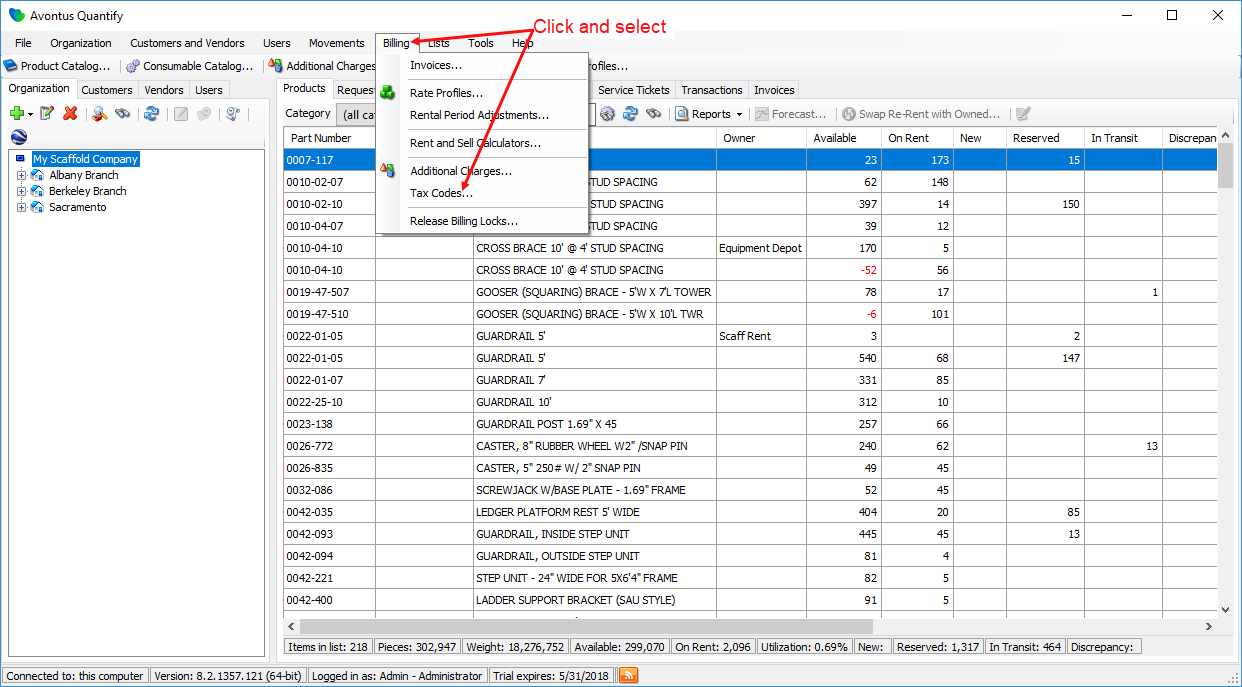
- Click the Billing menu and select Tax Codes.
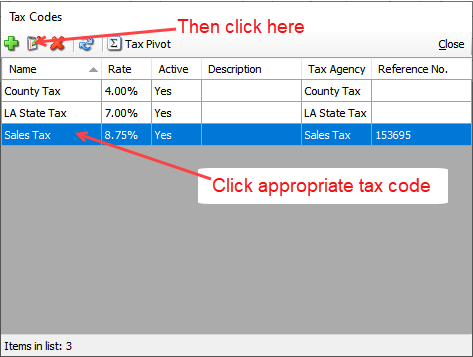
The Tax Codes dialog appears, displaying existing tax codes - Click the appropriate Tax Code, to select it.
- Click the Edit Selected Item button (
 ).
).
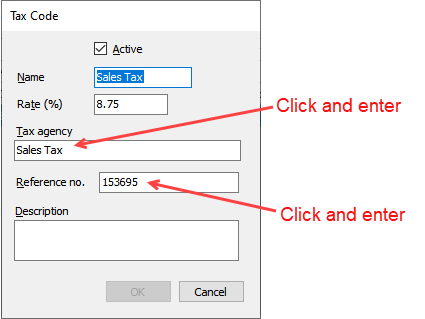
The Tax Code dialog appears. - Click in the Tax Agency text field and enter the name of the tax agency.
The agency will appear on the Quantify Invoice and the invoice exported to Sage 50. - Click in the Reference No. text field and enter your reference number for internal use.
- Click OK.
The Tax Codes dialog returns, displaying the new tax code. - Repeat the above procedures for each necessary Tax Code.
- When you are done, click Close in the Tax Codes dialog.