You can use Handset Designer on more than one machine, but you can only use it on one machine at a time. To make this possible, you deactivate Handset Designer on one machine and use the same Handset Designer license on another machine.
To deactivate the license to allow activation on another computer:
- Launch Handset Designer on the computer with the activated license.
If you are unable to locate the activated computer, are no longer able to use the activated computer or are otherwise unable to open the activated license of Handset Designer, contact support@avontus.com for assistance. - Click the Handset Designer tab and click License Info.

The Handset Designer License Info dialog appears. - Click Deactivate License.
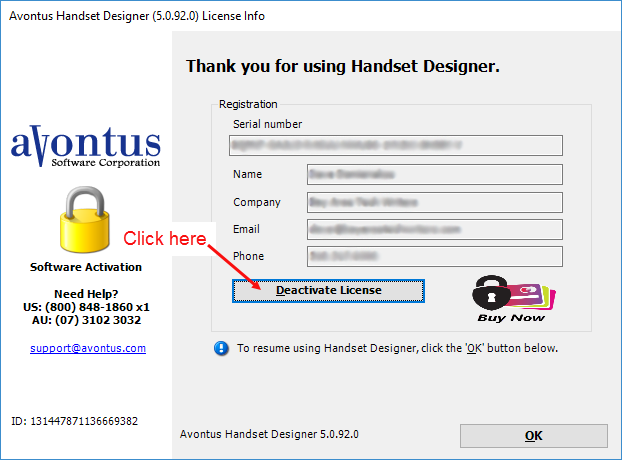
A confirmation message appears. - Click Yes.
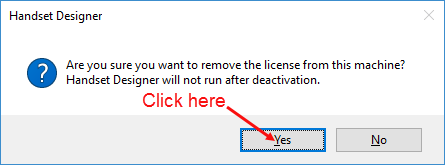
The license is now available to activate on another computer.
Note: It may take several minutes after deactivation for the license record to update on the activation server. If you continue to receive a message on another computer saying that the license is already active after deactivating, wait a few minutes and try again. Activation records can take up to an hour to update.