Who is this for?
This article is for IT administrators who manage identity and access for their organization and need to configure Single Sign-On (SSO) between Microsoft Entra ID (formerly Azure Active Directory) and Avontus Quantify. You will need access to your organization's Azure portal and Quantify's Global Options. If you are setting up SSO for an external organization whose users need access to your Quantify system, share this article with their IT team — they will need to complete the same steps on their end.
Warning: Do not use QUAD without having an active Quantify Web subscription.
Introduction and Prerequisites
There are two ways to log in, Quantify supports two authentication methods, and both work side by side:
Standard username/password - always available, encrypted, and works for any user regardless of SSO configuration.
SSO via Microsoft Entra ID (formerly Azure Active Directory) - available for users whose username is an email address on a domain configured in Quantify's Global Options.
Quantify determines which method to use automatically, at login, depending on whether a user enters an email or username.
When a user enters their username, Quantify checks whether it is an email address and whether that email domain matches one of the configured SSO domains. If both are true, Quantify routes authentication through Entra ID and hides the password field on the sign-in dialog box.
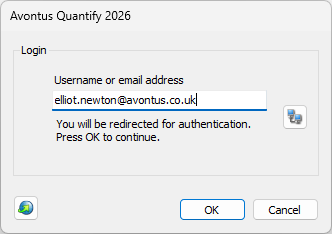
If the username is not an email address, or the domain isn't configured for SSO, Quantify uses standard username/password authentication.
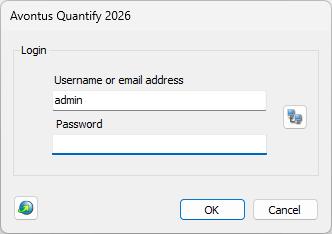
If you want to enforce SSO for your entire organization with no password fallback, every user's username in Quantify needs to be an email address on a domain you've configured in Global Options. Any user whose username is not an email address, or whose email domain isn't configured, will continue to authenticate with a password.
The following articles will explain how to use Microsoft Entra ID to host your own database on Quantify.
You can also watch a video of these instructions here: QuAD Video Tutorial.
Note: Avontus does not provide support for setting up your Azure database.
Creating an Azure database is easy and is mostly done in the Avontus QuAD (Quantify Azure Deployment) app.
However, you must first create the Azure Active Directory App Registration in the Azure portal.
Note: When creating an Azure/Microsoft Entra ID database, all the settings should be preserved except the secret key.
Prerequisites
Quantify Web
A Microsoft Azure Subscription.
Your region - click https://azurespeedtest.azurewebsites.net/ to find the best region for you.
The chosen name of the Subdomain (only if using a custom domain).
Access to DNS Server (only if using a custom domain).
SSL certificate if using custom DNS (only if using a custom domain)
You will need to download the QuAD app, which can be found here - https://download.avontus.com/quad/publish.html
Default bacpac file
The first step is Setting Up The Azure Active Directory.