Quantify's Multi-Edit feature enables you to edit some of the properties in multiple Scaffolds at the same time. For a complete list of the properties you can edit, refer to Multi-Edit Selected Scaffolds Items Index below.
NOTE: The features mentioned in this article are only available in the Industrial Edition of Quantify.
Editing Multiple Scaffolds
To edit multiple scaffolds:
Click the appropriate location and click the Scaffold Register tab.
Click the Scaffolds you want to edit, then click the Change dropdown and select Multi-Edit Selected Scaffolds.
.gif)
The Multi-Edit Scaffolds dialog appears.Click the Item dropdown and select the item to edit.
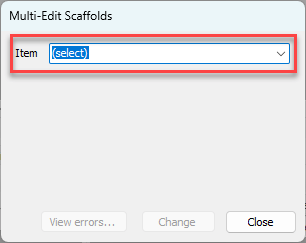
The Multi-Edit Scaffolds dialog refreshes.Note: For these procedures, Step was selected.
As necessary, click the Clear Current Value checkbox.
As necessary, click the New Value dropdown and select the appropriate value.
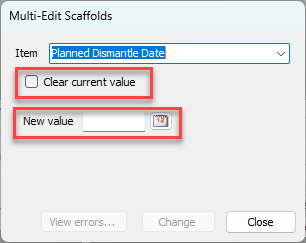
Click Change.
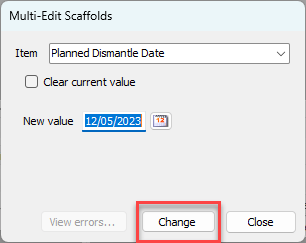
A confirmation dialog appears.Click OK.
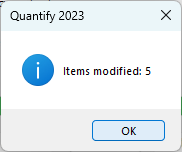
Multi-Edit Selected Scaffolds Items Index
The Multi-Edit Selected Scaffolds feature allows editing of the following items/fields:
NOTE: The features mentioned in this article are only available in the Industrial Edition of Quantify.
Item | Type | |
|---|---|---|
Actual Build Date | Date | |
Actual Dismantle Date | Date | |
Actual Load Date | Date | |
Builder | Dropdown, Users | |
Customer Representative* | Dropdown, Customer Contacts | |
Customer Requestor* | Dropdown, Customer Contacts | |
Dismantler | Dropdown, Users | |
Foreman | Dropdown, Users | |
Inspection Frequency | Number | |
Inspector | Dropdown, Users | |
List 1** | Dropdown, List 1 Global List Items | |
List 2** | Dropdown, List 2 Global List Items | |
Planned Build Date | Date | |
Planned Dismantle Date | Date | |
Planned Load Date | Date | |
Priority** | Dropdown, Scaffold List | |
Project** | Dropdown, Scaffold List | |
Requested By | Dropdown, Customer/Internal | |
Status | Dropdown, Scaffold Statuses | |
Step** | Dropdown, Scaffold List | |
Stop Rent Date | Date | |
Tag Date 1*** | Date | |
Tag Date 2*** | Date | |
Tag Text 1*** | Text | |
Tag Text 2*** | Text | |
Tag Text 3*** | Text | |
Tag Yes/No 1*** | Yes/No | |
Tag Yes/No 2*** | Yes/No | |
Yes/No 1** | Yes/No | |
Yes/No 2** | Yes/No |
*Field only available to edit when all selected Scaffolds are from the same Job Site.
**Field name can be changed through the Global Options dialog and may vary from the default name shown here.
***Custom field. Field name may vary from the default name shown here, based upon selected Scaffolds and Job Site settings. When Scaffolds from different Job Sites are selected, Quantify will always display the default names as shown .