When an error occurs in Quantify, you can automatically report the issue to Avontus. Sending the error report helps us improve Quantify, by enabling us to investigate the specific issue immediately.
To send an error report:
- Click Send Error Report.
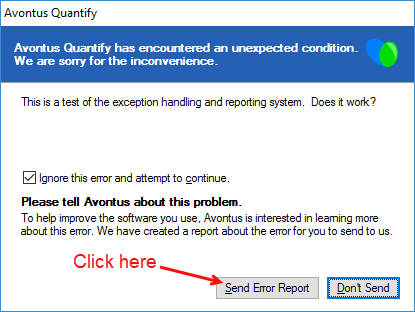
A ticket is created in Avontus Support reporting the issue.
The Error Report dialog refreshes. - Do one of the following:
- Click in the Email address text field and enter your email address, to enable the ticket to be opened in your name and to enable Avontus Support to contact you about this report.
- Click the I prefer to send this report anonymously check box (to put a check in it) to remain anonymous.
Note: If you do this, Avontus support will not be able to contact you about this report.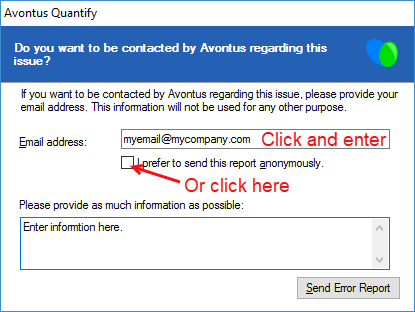
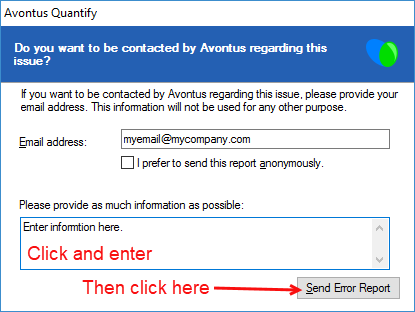
- Click in the Error Information text field and enter information about what you were working on when the error occurred.
- Click Send Error Report.
When Quantify sends the report, the Error Report dialog refreshes, advising you of the status of the error report submission.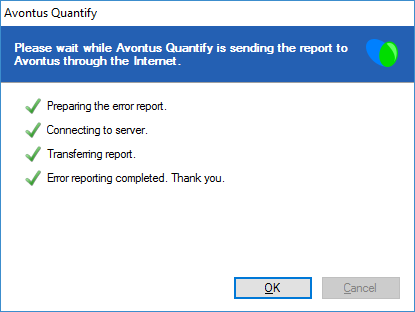
- Click OK.