Accessed from the Global Settings, the Item Numbering Options dialog enables you to configure how Quantify handles item numbering. Items include Estimates, Invoices, Transactions, etc. So, for example, you can configure the number at which Estimate numbers begin and the numerical increment between two consecutive Estimate numbers. You can also configure the numbering format. You can change each of these to suit your organizational requirements.
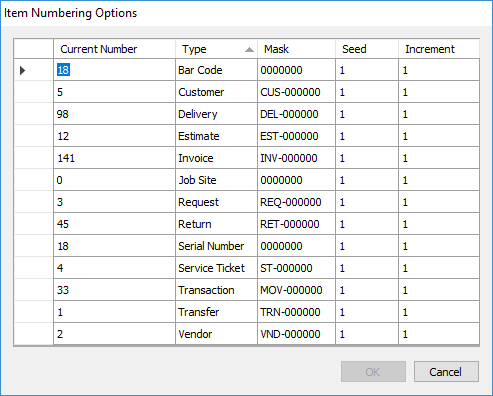
| Current Number | This column displays the current number of each item in Quantify. In the example above, there are currently 12 Estimates in the system. |
| Type | This column displays the type of item being numbered. |
| Mask | This column displays the format for each item's numbering. In the example above, the Estimate mask has this format: EST-000000. All Estimate numbers will begin with the three letters EST, followed by a hyphen and then a six-digit number. |
| Seed | This column displays the number at which each Estimate's numbering begins. In the example above, all Estimate numbers will have a six-digit number beginning with 000001. |
| Increment | This column displays the numerical increment between two consecutive Estimate numbers. In the example above, the increment is 1. So, all Estimate numbers begin with EST-000001 (the seed). The second estimate will have the number EST-000002. And so on. |