Create Estimates for rental equipment or for the sale of new or rental equipment. Reservations or Shipments can easily be created from Estimates.
Note: Estimates do not affect Branch Office inventory counts.
Estimate reports can be customized, adding a custom note, adding signature lines, as well as customizing the report footer. These customizations are set on the About the Global Options Dialog Reports Tab in The Global Options Dialog.
This article contains the following:
About Estimates
You can create Estimates for rental equipment or for the sale of new or rental equipment. Estimates are assigned to Branch Offices.
Note: Estimates do not affect Branch Office inventory counts.
Quantify enables you to create a new Estimate based on inventory currently located at a job site and to import Product quantities into Estimates. Once created, you can edit multiple Estimates at the same time. You can easily create Reservations, Shipments, and Deliveries from Estimates.
The Estimates Tab
You assign Estimates to Branch Offices. So, if you want to see available Estimates, you must click a Branch Office in the Organization Tree. The areas in the Estimates tab provide details of each available Estimate.
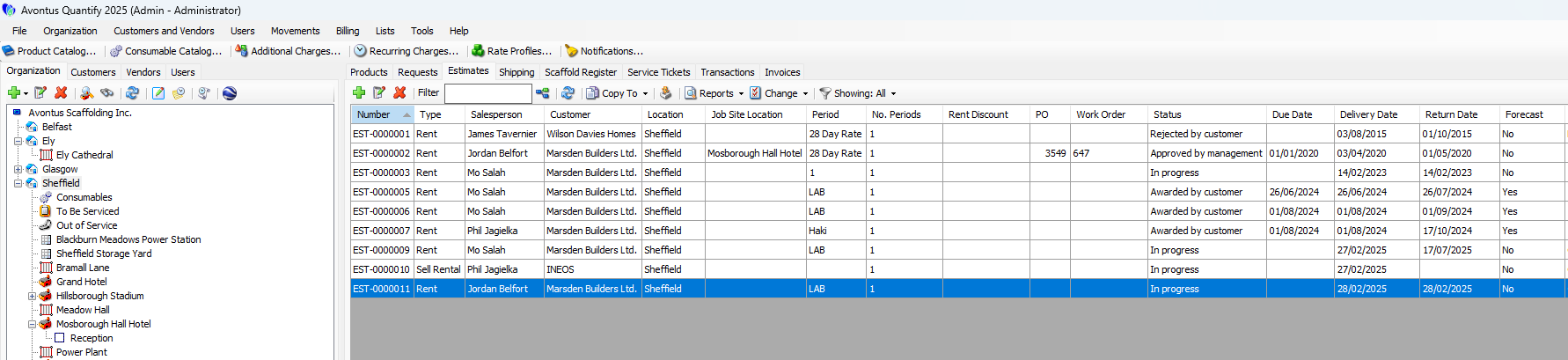
The top table shows information about all the Estimates in the tab and provides features for viewing and working with Estimates, including:
Copy To dropdown | The Copy To dropdown enables you to use a selected Estimate to make: - A new Estimate - A Reservation - A Delivery - A Shipment to a Scaffold - A Sell available Transaction - A Sell Consumable Transaction |
Import button | The Import button enables you to import Product quantities from another Avontus program, like Avontus Designer. |
Reports dropdown | The Reports dropdown provides access to: - A preview of the selected Estimate - The Estimate Summary pivot - Estimate Detail pivot - Consolidated pivot for Selected Estimates |
Change dropdown | The Change dropdown enables you to edit multiple, selected Estimates in one interface. |
Filter dropdown | The Filter dropdown enables you to filter the Estimates tab by Estimate status: - In Progress - Approved by management - Awarded by customer - Rejected |
The bottom area shows details about the selected Estimate, including:
Bill of Materials tab | The Bill of Materials tab displays a list of materials in the Estimate. |
Consumables tab | The Consumables tab displays a list of consumables in the Estimate. |
Unit-Hours tab | The Unit-Hours tab displays the Estimates of time involved in the work. |
Additional Charges tab | The Additional Charges tab displays a list of additional charges in the Estimate. |
Recurring Charges tab | The Recurring Charges tab displays a list of recurring charges in the Estimate |
Attachments tab | The Attachments tab displays any items attached to the Estimate and enables you to attach new items. |
Details tab | The Details tab displays details of the Estimate (prices, cost, charges, etc.) |
Forecast tab | The Forecast tab displays any forecast information associated with the selected Estimate. |