In order to understand whether Wall lengths include or exclude the intersection Wall thickness, you must understand reference lines. Each Wall has a reference line. This line can be at the top or at the bottom of a Wall, depending on the Wall's direction. The reference line is visible as a dashed green line that runs across the Wall shape and extends to the edge of the drawing, following the direction of the circular handle at the corner of the Wall. Although it is not always obvious (especially when Walls are connected), the reference line is the length of the Wall shown in the gray text.
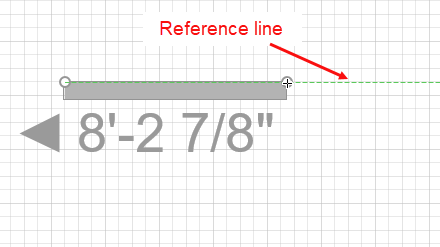
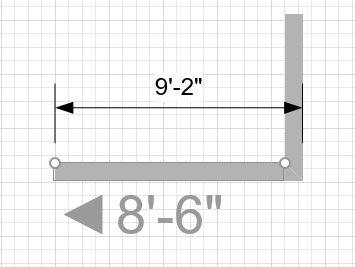
Below, you can see two Walls connected at a right angle. Notice that the reference lines run along the outside of the building structure.
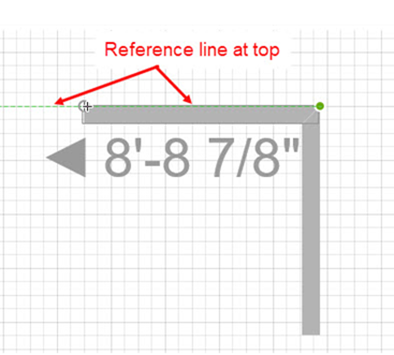
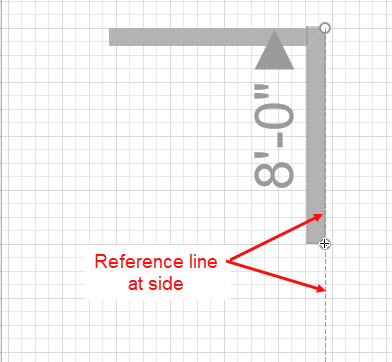
If you keep reference lines to the outside of the structure. the Walls will always have the length that is shown in the grey text.
When the reference line is to the inside of the Wall, the Wall length text does not include the thickness of the adjoining, vertical Wall. It is important to remember this fact when you draw and resize Walls.
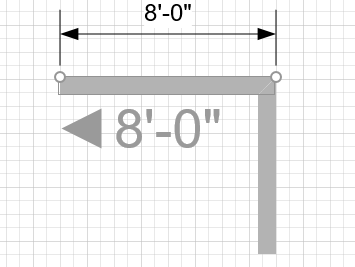
You can easily change the direction of Walls using various methods. For more information, refer to Flipping the Direction of a Wall.