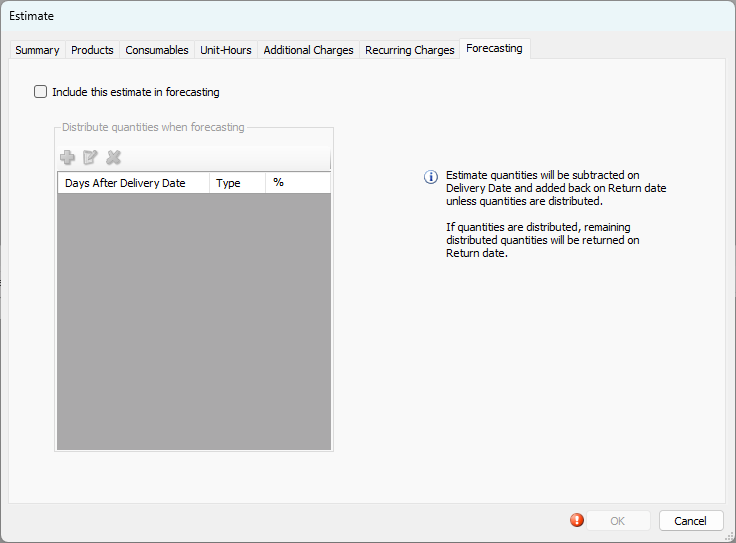
Use the Forecasting tab to include an Estimate in Forecasting reports. The delivery date and any noted distribution will be used to affect Forecasting quantities.
Note: Delivery and return quantities can be affected by distribution entries.
Refer to Forecasting for complete Forecasting information.
Include This Estimate in Forecasting | When this checkbox has a check in it, Quantify will include the current Estimate in Forecasting reports. |
Add Distribution ( | If quantities will be delivered/returned over a period of time, click this button to add a distribution percentage. |
Edit Distribution ( | Click an existing distribution percentage, then click this button to edit that percentage. When you click this button, the Distribute Forecast dialog appears. |
Delete Distribution ( | Click an existing distribution percentage, then click this button to delete that percentage. |
Days After Delivery Date | This column displays the number of days after the delivery date that the quantities will be delivered/returned. |
Type | This column displays whether each distribution is a delivery or a return. |
% | This column displays the percent of the total quantities in the Estimate to send/receive.. |
 )
) )
) )
)Distribute Forecast Dialog
The Distribute Forecast dialog appears when you click the Add Distribution and Edit Distribution buttons. Use it to configure quantity distributions.
Note: Distribution of quantities is optional.
If no distribution is noted, all quantities will be subtracted on the delivery date and added back on the return date on Forecasting reports.
Warning: When using distribution for delivery quantities, the total of all delivery percentages must equal 100%. If not, undistributed quantities will not be included in Forecasting reports.
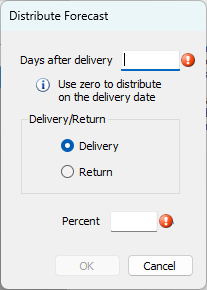
Days After Delivery | The number of days after the delivery date that the quantities will be delivered/returned |
Delivery | Use this radio button to configure the current distribution as a delivery. |
Return | Use this radio button to configure the current distribution as a return. |
Percent | Use this text field to configure the percent of the total quantities in the Estimate to send/receive. |
For the delivered amount, any remaining quantities/percentages not specifically distributed will NOT be delivered. For the returned amount, any remaining quantities/percentages not specifically distributed will be returned on the return date for the estimate.