The Dates and Inspections tab enables you to configure and track the dates for the loading, building and dismantling of the current Scaffold. It also enables you to keep track of any inspections that occur for this Scaffold.
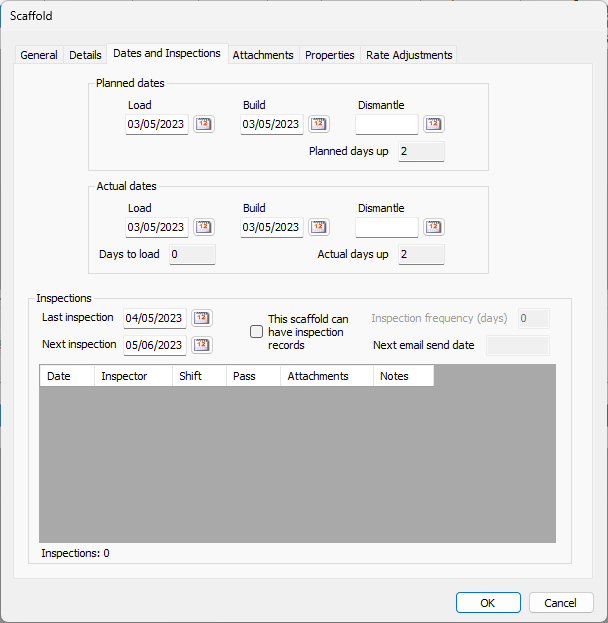
Use the information below to help you configure the Dates and Inspections tab, then continue with the rest of the tabs, as necessary.
| Planned Load | Enter the date on which the scaffold is planned to be loaded for shipping into this date field. |
| Planned Build | Enter the date on which the scaffold is planned to be built on site into this date field. |
| Planned Dismantle | Enter the date on which the scaffold is planned to be dismantled for return into this date field. |
| Planned days up | Enter the date on which the scaffold is planned to remain standing on site into this date field. |
| Actual Load | Enter the date on which the scaffold is actually loaded for shipping into this date field. |
| Actual Build | Enter the date on which the scaffold is actually built on site into this date field. |
| Actual Dismantle | Enter the date on which the scaffold is actually dismantled for return into this date field. |
| Days to load | Enter the date on which the scaffold is actually dismantled for return into this date field. |
| Actual days up | Enter the date on which the scaffold actually remains standing on site into this date field. |
| Last Inspection | Enter the date of the most recent inspection into this date field. |
| Next Inspection | Enter the date of the next inspection into this date field. |
| This scaffold can have inspection records | Use this checkbox to determine whether the Scaffold can keep inspection records. |
| Inspection frequency (days) | Enter the interval (in number of days) between inspections into this text field. |
| Next email send date | This text field displays when next email notification will be sent. This is generally same as next inspection date. |
| Date | This column displays the date on which each inspection occurred. |
| Inspector | This column displays the name of the inspector for each inspection. |
| Shift | This column displays the shift on which each inspection occurred. |
| Pass | This column displays the results of each inspection: pass or fail. |
| Attachments | This column displays any attachments associated with each inspection. |
| Notes | This column displays any notes associated with each inspection. |