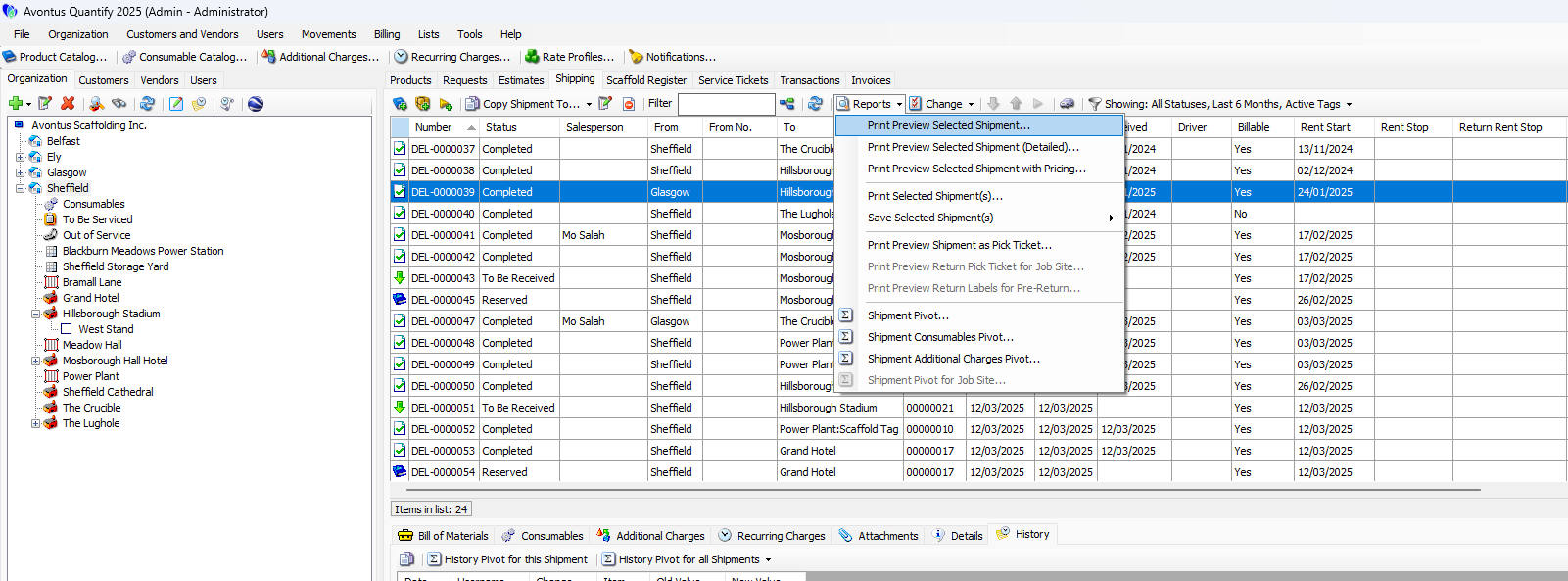
Quantify enables you to select one or more Shipments and generate reports for those shipments. The Reports dropdown in the Shipping tab provides access to all the reports listed below.
Quantify provides five options for viewing, saving and printing Shipping reports.
Print Preview Shipment(s)
Quantify provides three options to preview the information associated with a selected shipment:
Selected Shipment
Selected Shipment (Detailed)
Selected Shipment with Pricing.
Print or Save Shipment(s)
The Reports dropdown enables you to print a Shipping report for one or more selected Shipments or save it as an Excel or PDF file.
Print Preview Pick Tickets
Quantify provides three options to preview the information associated with a selected Shipment's pick tickets.
Print Preview Shipment as Pick Ticket lists the equipment on selected completed Shipments and reservations.
Print Preview Return Pick Ticket for Job Site shows all equipment at the selected Job Site. (A Job Site must be selected in the Organization Tree for this option to be enabled.)
Print Preview Return Labels for Pre-Return generates labels in selected pre-returns. Return labels include the Shipment number, date, driver, customer and the location from which the equipment is being shipped. They print upside down. (A single pre-return must be selected in the Shipping grid for this option to be enabled.)
Pivot Reports
Pivot reports give you access to the specific data you require. The Shipping tab provides access to the following: