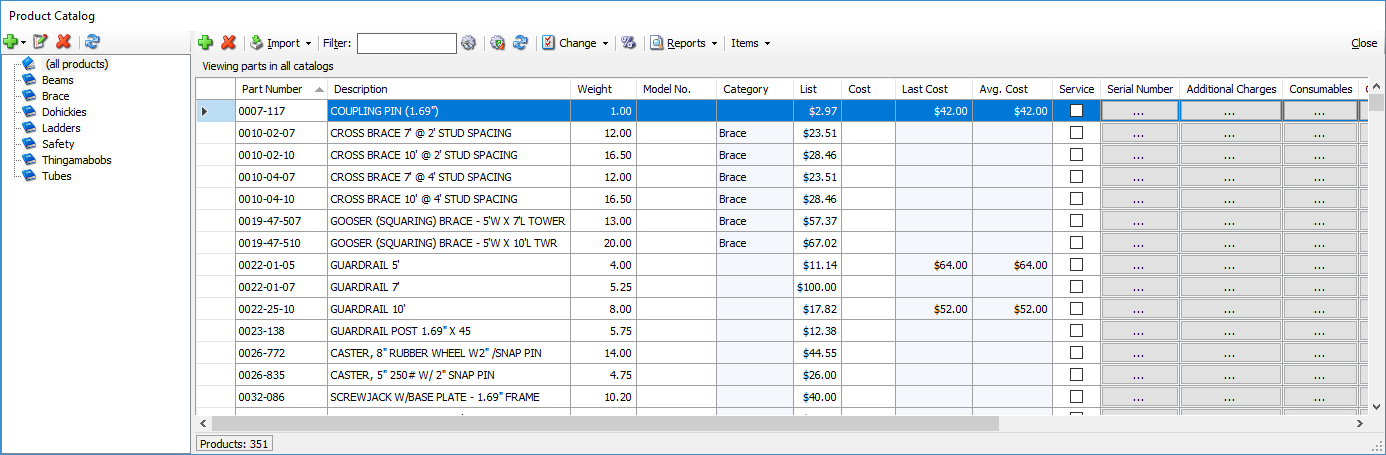
The Product Catalog is the central registry for all products available to you. It contains product detail information. (You enter or set available inventory amounts for locations using Inventory Adjustments or shipments.)
Note: You cannot delete a product from the Product Catalog if it is stocked at any location or has been included in any shipment or transaction.
To help you organize your inventory, you can create product categories and assign products to them. You can enter and (in most cases) edit the following information for each product in the Product Catalog:
| Part Number | The part number assigned to each part Note: This must be unique |
| Description | A description of each part |
| Weight | The weight of each part |
| Model Number | The model number for each part |
| Category | The category (as seen in the left side of the Product Catalog) to which each part belongs |
| List Price | The list price for each part |
| Cost | The cost of each part |
| Last Cost | The cost of the part the last time it was purchased |
| Average Cost | The per-piece average cost across multiple transactions for available equipment. For example: There are two transactions for 10' ledgers: Transaction 1: 10 pieces at $10 Transaction 2: 100 pieces at $50 These transactions have a total cost of $5100/110 pieces, resulting in an average cost of $46.36. This is updated after each transaction involving this part. |
| Service | When checked, the part will default to be returned to the To be Serviced queue when returned from a job |
| Serial Number | A list showing the amount of serial numbers (if any) for each serialized part |
| Additional Charges | A list of additional charges (if any) associated with each part that will appear on service tickets and inspections |
| Consumables | A list of consumables (if any) associated with each part that will appear on service tickets |
| Components | A list of components (if any) associated with each part |
| Manufacturer | The name of each part's manufacturer. |
| Manufacturer Part Number | The part number that each part's manufacturer assigned |
| Factor | The Factor Multiplier assigned to each product |
| Utilization | When checked, the part will be included in Utilization reports. |
| ROP | Reorder Point: the number of units of a product at which more product should be ordered |
| ROQ | Reorder Quantity: the number of units of a product that should be ordered once the reorder point has been reached |
| Comment | Add a comment related to the part. |