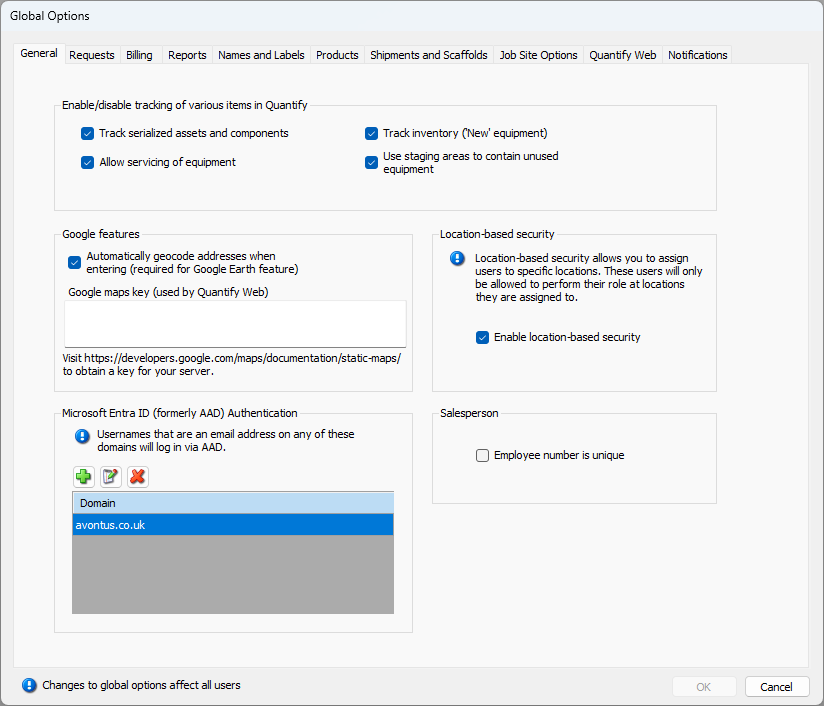
The General tab enables you to enable/disable different types of tracking and Location-Based Security, as well as to configure Quantify for use with Google Earth.
The Enable/Disable Tracking of Various Items In Quantify Section
The properties defined in this section enable you to enable/disable the tracking of equipment in different conditions and/or locations.
Track serialized assets and components | When this checkbox is checked, Quantify tracks Products and components that have been assigned serial numbers. This must be enabled in order for you to add serialized parts to the Product Catalog. Refer to Working with Products with Serial Numbers. |
Allow servicing of equipment | When this checkbox is checked, Quantify allows items that need repair, inspection, routine maintenance, etc. to be placed in the To Be Serviced queue. This must be enabled in order for you to use Quantify's Servicing and Inspections features. Refer to About Servicing and Inspections. |
Track inventory (New equipment) | When this checkbox is checked, Quantify adds a new column to the Products tab that appears when users click a Branch Office and the Products tab. This enables users to track the purchase and sale of new (unused) equipment. It also enables users to transition new equipment to equipment that is available for use on a Job Site. To learn about buying and selling new equipment, refer to Purchasing and Selling Available and New Products; Ordering Available, Re-Rent and New Products. To learn about more types of transactions, refer to Working with Transactions for more information. |
Use staging areas to contain unused equipment | When this checkbox is checked, Quantify allows Staging Areas to store unused equipment. This must be enabled in order for you to use Quantify's Staging Area features. Refer to Working with Staging Areas for more information. |
The Google Features Section
This section enables you to leverage Google Earth for use with Quantify.
Automatically geocode addresses when entering (required for Google Earth feature) | When this checkbox is checked, Quantify automatically converts addresses into the GPS coordinates (the latitude and longitude) of the physical address. This is a requirement for using Quantify Web. |
Google maps key (used by Quantify Web) | Use this text field to define the Google Maps key, for use with Quantify Web. (Quantify Web can use Google Maps to geo-locate your Job Sites, Scaffold Tags and other locations, which requires a Google Maps key for your server.) Note: Typically the use of the API Key from Google is free (Google Maps Platform offers a free $200 monthly credit for Maps, Routes, and Places) however, please refer to Google for further details on their Pricing Plans. |
Location-Based Security Section
Enable location-based security | When this checkbox is checked, Quantify allows Location-Based Security, which enables users to assign individual users to specific locations. Refer to Location-Based Security for more information. |
Location-Based Security Section
Salesperson | When this checkbox is checked, Quantify will not allow salespeople to share the same employee number. |
Microsoft Entra authentication
Microsoft Entra | This allows you to log in with usernames on any of these domains created via the Azure Active Directory. Note that you can have as many domains as you wish. |
For more information on Registering a Domain, visit Registering a Domain